oosVersion 2.1
Speedtest
Measure download speed, upload speed, and latency
Speedtest
Speedtest measures download and upload data rates and the response time between OOS and the test server.
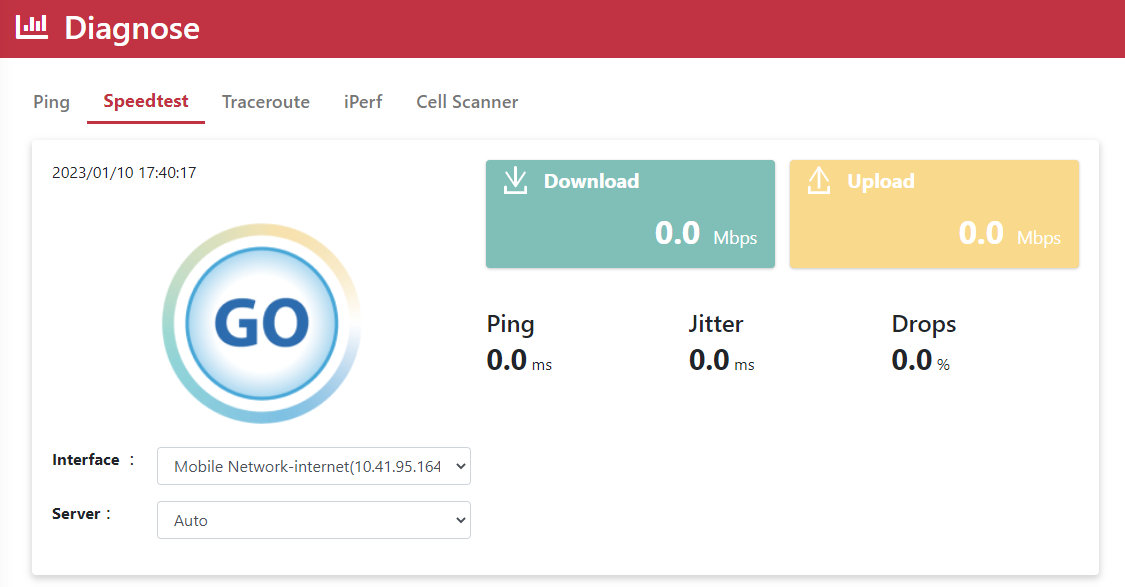
Run a Speed Test
- Go to
Diagnose > Speedtest. - Select Mobile Network for Interface.
- Select Auto for Server.
- Click GO.
| Name | Description |
|---|---|
| Download | The rate at which data is received, measured in Mbps. |
| Upload | The rate at which data is sent, measured in Mbps. |
| Ping | The time for data to travel from the device to the server, also called latency, measured in ms. |
| Jitter | The average variation between consecutive ping measurements. Lower is better. |
| Drops | The percentage of packets that could not be delivered and had to be requested again, also called packet loss. |
- The result is recorded in the table.