oosVersion 2.1
iPerf
Use iPerf to measure network throughput
iPerf
iPerf is a network-performance tool with client and server modes. It creates data streams to measure throughput between two endpoints.
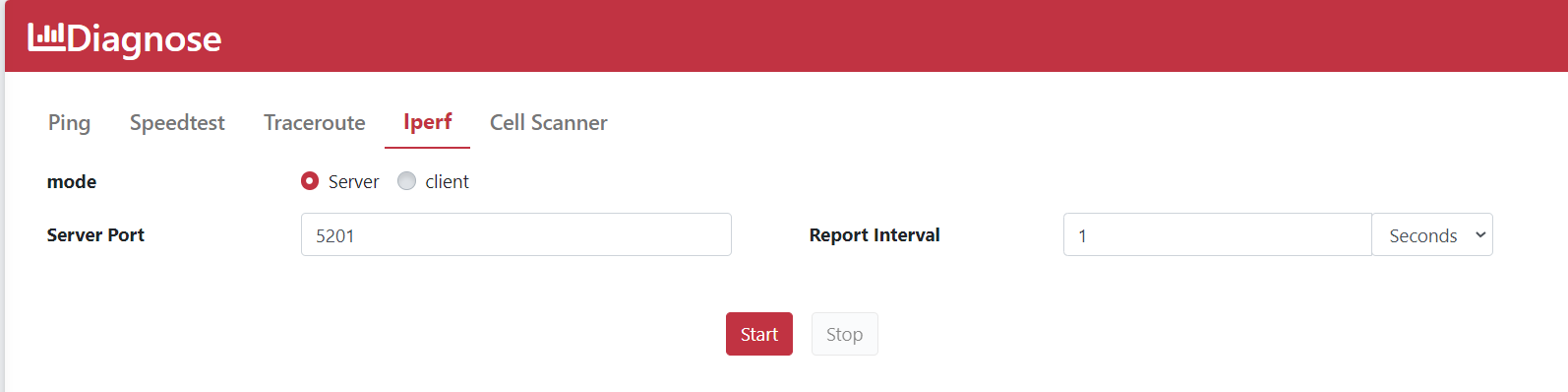
Server Mode
| Name | Description |
|---|---|
| Server Port | The port on which the server listens and the client connects. Both ends must use the same port; the default is 5201. |
| Report Interval | How often a report is generated. The default is 1 second; minutes or hours may also be used. |
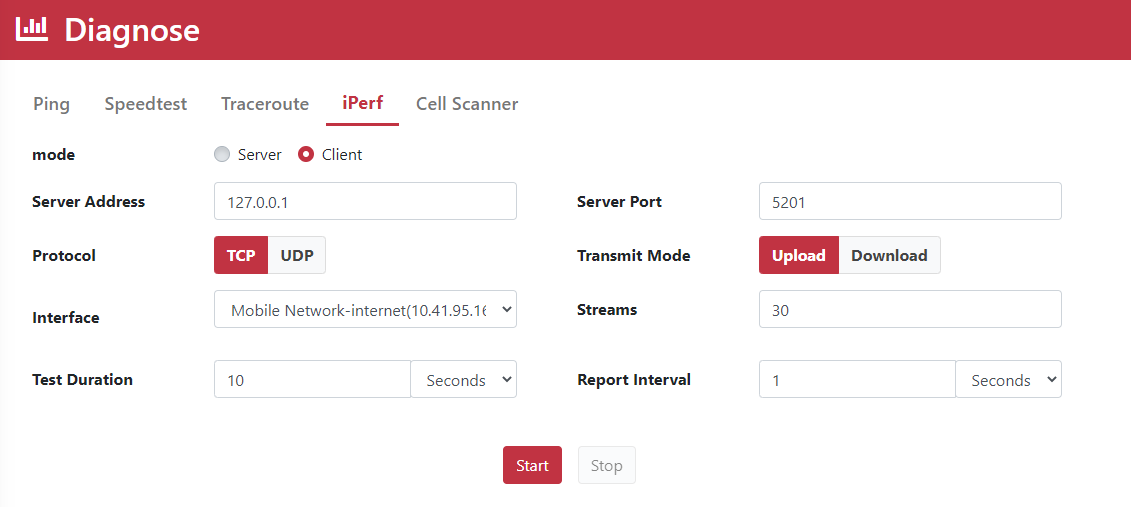
Client Mode
| Name | Description |
|---|---|
| Server Address | The IP address of the host running the iPerf server. |
| Server Port | The shared client and server port; the default is 5201. |
| Protocol | Select TCP or UDP. UDP requires additional bandwidth and packet-size settings. |
| Interface | Select the WAN interface on which to run iPerf. |
| UDP Bandwidth | Target bandwidth; the UDP default is 128 KB/s, while TCP is unlimited. |
| UDP Packet Size | Target UDP packet size; the default is 1470 bytes. |
| Transmit Mode | Select upload or download. |
| Test Duration | How long the test runs; the default is 10 seconds. |
| Streams | Run multiple streams to measure network performance. |
| Report Interval | How often a report is generated. The default is 1 second; minutes or hours may also be used. |