Authentication
Configure AAA and RADIUS servers for secure access control and user authentication in OOS.
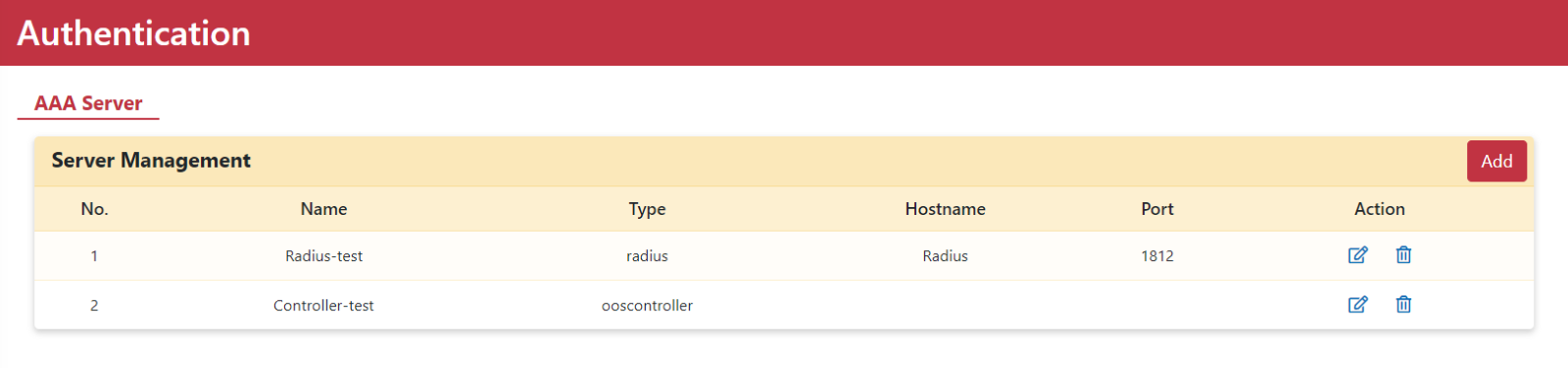
The Authentication page is a vital element of access control and network security, dedicated to configuring AAA servers. On this page, you can set up a RADIUS server by entering parameters provided by your RADIUS provider. Settings can be configured directly through the RADIUS server or via the OOS controller to manage user access securely.
Adding a AAA Server
Step 1. Go to the Security > Authentication > AAA Server page.
Step 2. Click the Add button to open the Add Server modal dialog.
Step 3. Enter a server name, select Radius as the type, and enter the RADIUS server parameters including Hostname, Server Port, and Pre-shared Key.
Note: You must deploy your own RADIUS server and enter parameters matching your server deployment.
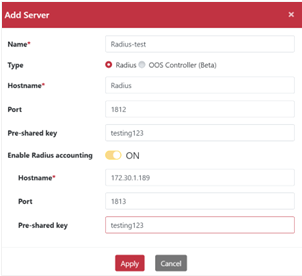
Step 4. Click the Apply button to save configurations.